What a lifetime proxy session is, and when to use one
2026-07-21 · Bazyl
A lifetime proxy session is a sticky session with no clock on it. You claim an exit
IP once and keep it until that IP leaves the network — not until a 10-minute or
30-minute window runs out. Other providers call it a long session, a hard session,
or a non-expiring session. It is the same idea, and in Basil it is one flag:
_lifetime-hard on the end of your password.
Most of the time you do not want this. The rest of the time nothing else works.
What a session actually is
A residential pool is thousands of real household connections. Ask it for a page and it picks one, routes your request through it, and forgets about you. Ask again and you get a different one. That is the default, and there is no flag for it — rotation is what happens when you say nothing.
A session is a name you attach to a slot in that pool:
residential.basilproxies.com:1000:USER:PASS_country-US_session-k4mz61pq_lifetime-hard
_session-k4mz61pq is the name. You invent it — any eight characters will do. Send it
again and you land on the same IP. _lifetime-hard is how long the pool honours the
name, and hard means "no timer".
Two details trip people up. The flags ride on the password, never the username. And the order is fixed: country, then city, then session, then lifetime. Everything else about the request is unchanged — same host, same port, same credentials, same code.
Rotating, timed, non-expiring
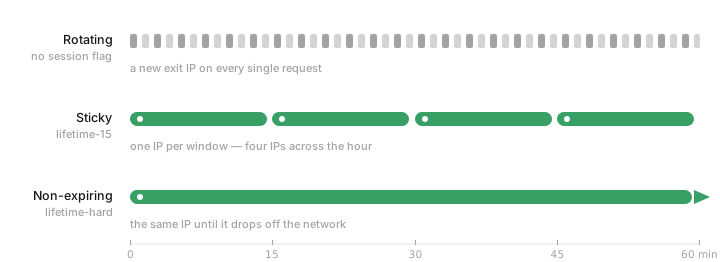
- Rotating — no flags. A different exit IP on every request.
- Timed sticky —
_session-k4mz61pq_lifetime-30. The same IP for the window you set, anywhere from 1 to 120 minutes. - Non-expiring —
_session-k4mz61pq_lifetime-hard. The same IP for as long as it stays online.
The middle option is where most work belongs. A timed session gives you a floor you can reason about — set 30 minutes and you know a job that takes 12 will finish on one address. Plain rotation is for volume, where changing address is not a limitation at all; it is the entire defence.
The last one removes the ceiling. That is useful far less often than it sounds, and genuinely irreplaceable when it is.
How long "lifetime" really lasts
Here is the part most provider documentation skips. A residential IP is somebody's home internet. It goes away when they reboot the router, when a phone walks out of Wi-Fi range, when a laptop lid closes. Nobody — us, you, or the household — controls that.
So _lifetime-hard means there is no timer. It does not mean there is no end.
Real holds range from a few minutes to most of a day, and you cannot know which one you drew until it breaks. Two rules follow from that, and they matter more than anything else in this post:
- Check the exit IP, do not assume it. One request to an IP echo endpoint before a step that matters costs nothing and tells you everything.
- Have a plan for the change. When the IP goes, the correct move is a new session id and a redo of the login or the queue — not retrying the same id harder.
If you need one address to survive for weeks rather than hours, no session flag will give you that. That is what ISP proxies are: an IP you rent outright for the billing period, the same one after every renewal. Different product, different guarantee.
Where long sessions earn their keep
Queues that outlast a timer. Limited-release drops — Pokémon Center restocks are the textbook case — put you in a virtual waiting room that can hold you far longer than a 30-minute window. Your place in that line is tied to who the site thinks you are. A new IP two thirds of the way through is a new visitor, and a new visitor goes to the back.
Anything behind a login. Sign in, clear the second factor, navigate three pages deep, export a report. Every step after the first is being checked against the network you signed in from. Change it mid-flow and you are re-authenticating at best.
Carts and checkouts. A cart is state held against a session. Multi-step forms are the same. Finishing what you started on the address you started it from is the whole requirement.
Slow crawls that carry a cookie. Paginating a logged-in interface is one long conversation, not a thousand independent requests. It wants one IP.
One account, one address. If you run accounts that are meant to look like separate people, the address is half the identity. Nothing about that works if it changes hourly.
Where they are the wrong tool
Volume scraping. Ten thousand product pages through one IP is a rate-limit waiting to happen. Rotate, and let the pool do its job.
Anything reputation-sensitive at scale. One IP carries one reputation. Everything you send through it is judged together, and when the target sours on that address, all of it stops at once.
High concurrency. Fifty workers behind one address do not look like fifty users. They look like one very strange one.
As a fix for being blocked. A session holds an IP; it does not improve it. If the target is refusing that address, holding onto it harder is the opposite of the fix.
Turning one on
In the dashboard: Residential, set Session Type to Sticky, press Max. The
label reads Non-expiring and every generated string ends in _lifetime-hard. Building
the endpoint yourself is one flag, no dashboard needed.
Both routes, with screenshots and code, are in the walkthrough: how to set a residential proxy session to never expire.
The full flag reference — countries, cities, ports, protocols — lives in the docs.
Common questions
- What is a lifetime proxy session?
- A lifetime proxy session is a sticky session with no expiry timer. You attach a session id to your request and the proxy network keeps routing you through the same exit IP until that IP leaves the network, rather than releasing it after a fixed window like 10 or 30 minutes. It is also called a long session, a hard session, or a non-expiring session.
- How long does a lifetime proxy session actually last?
- As long as the IP behind it stays online. Residential IPs are real home connections, so a session ends when that device disconnects — a router reboot, a phone leaving Wi-Fi, someone closing the app. In practice that ranges from minutes to many hours. Non-expiring means there is no timer, not that there is no end.
- Is a lifetime session the same as a static or dedicated IP?
- No. A lifetime session borrows one IP from a shared residential pool for as long as it stays up, and you cannot choose which IP or get it back once it drops. A dedicated ISP proxy is an IP you rent for the whole billing period, and it is the same IP after every renewal. If you need one address to survive for weeks, that is the ISP product, not a session flag.
- Does a longer session cost more?
- No. Residential and mobile proxies are billed by the gigabyte, and session flags are free. A one-minute session and a non-expiring one cost exactly the same for the same traffic.
- What is the longest timed sticky session I can set?
- 120 minutes on the endpoint, using the lifetime flag with a number of minutes. The dashboard slider stops at 60 and hands you the Max button after that, which switches the session to non-expiring instead of a longer countdown.
- Do lifetime sessions work on mobile proxies too?
- Yes. The session and lifetime flags are identical on mobile, just against the mobile host and its ports. Mobile IPs are shared by many subscribers behind carrier NAT and change more often than home lines, so expect shorter real-world holds.