How to set a residential proxy session to never expire
2026-07-21 · Bazyl
Two clicks in the dashboard, or one flag if you build your own endpoints. Set Session Type to Sticky, press Max, and every proxy string you generate holds a single residential IP with no expiry timer on it.
This is the walkthrough. If you want the concept first — what a session is, how long "no timer" really lasts, when holding one IP is a bad idea — read what a lifetime proxy session is instead.
What you need
An active residential plan and your dashboard login. Nothing gets installed, nothing gets reserved in advance, and no setting is saved anywhere — a session exists only because your request asks for it.
Step 1 — Open the Residential page
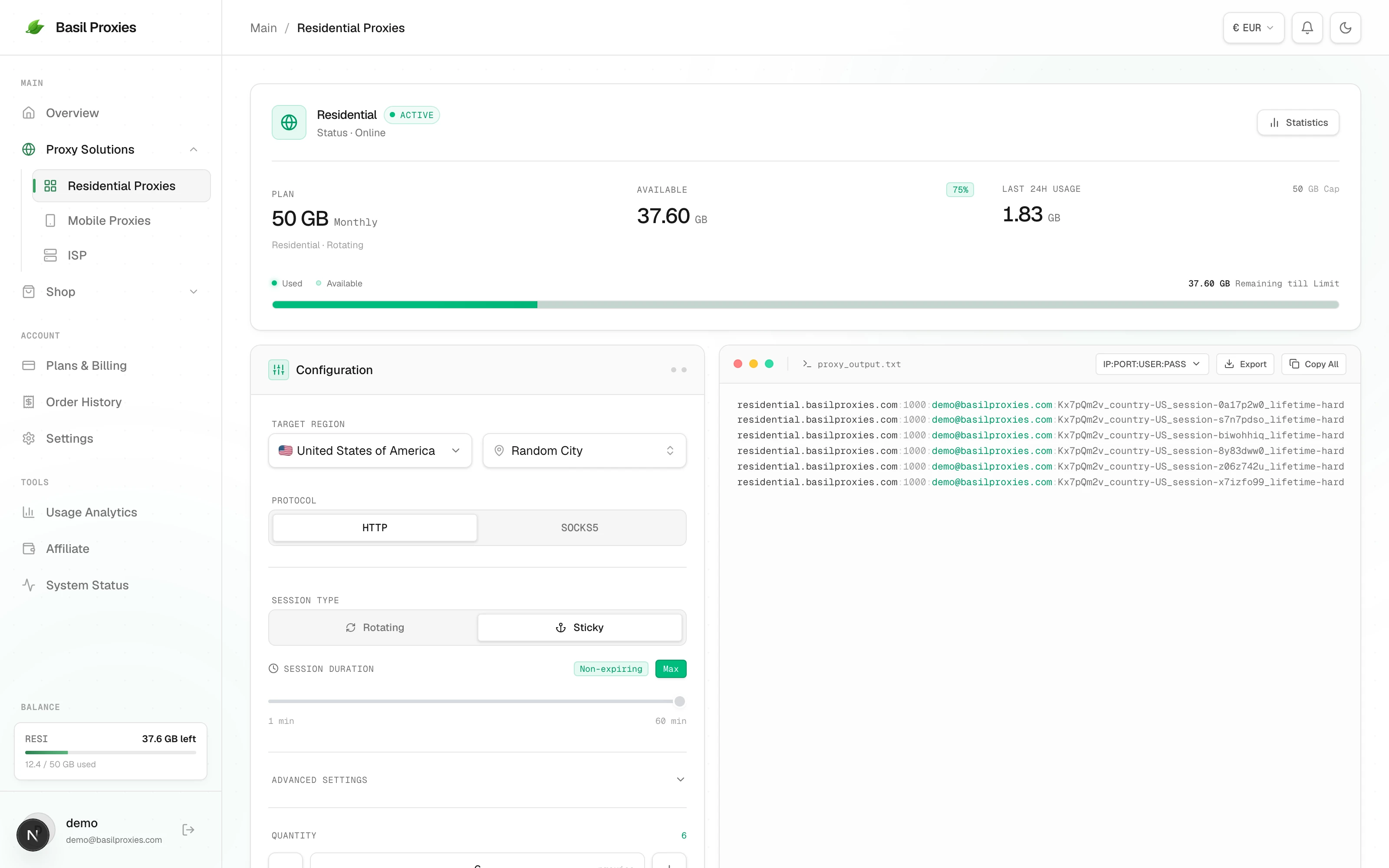
Sign in at app.basilproxies.com and pick Residential Proxies under Proxy Solutions in the left rail. Everything you need is on this one page: the configuration panel on the left, generated output on the right.
Step 2 — Choose where the IP should be
Set Target Region before you touch anything else. Pick a country, and optionally a city inside it — both become flags on the password, and both are decided at the moment the session starts. You cannot move a held IP to a different country later. That is rather the point of holding it.
Leave Protocol on HTTP unless you need SOCKS5. It changes the port, not the session behaviour.
Step 3 — Switch Session Type to Sticky
Rotating gives you a new exit IP on every request. Sticky attaches a session id, and the id is what the network matches to hold an address. The duration control only appears once Sticky is selected.
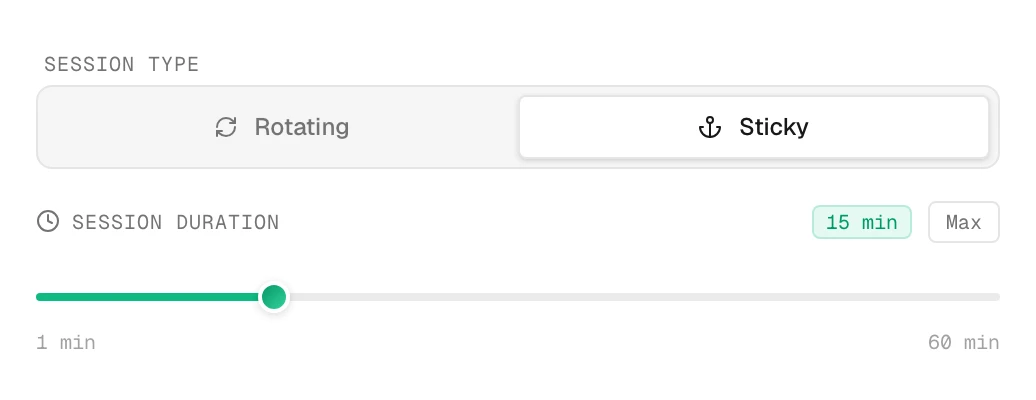
The slider runs from 1 to 60 minutes, and the green pill shows what you have picked. At this setting the session expires on schedule: 15 minutes in, the pool takes the IP back and your next request starts over somewhere else.
Step 4 — Press Max
Max is the whole feature. Press it and the pill changes to Non-expiring, the slider greys out, and the countdown is gone.
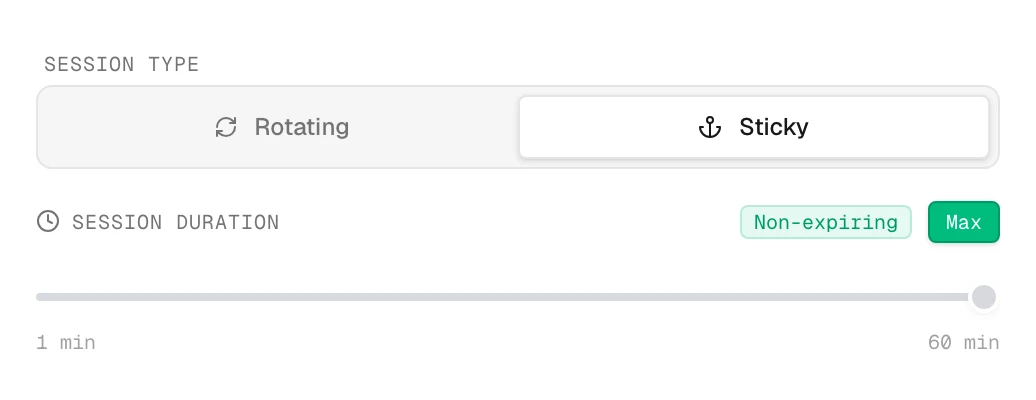
The IP is now yours until it leaves the network on its own, which is a real household connection going offline rather than a timer running out.
Step 5 — Generate and copy
Set Quantity to the number of concurrent sessions you want and press Generate Credentials. Each line gets its own random eight-character session id, so six lines means six different IPs held in parallel — not one IP six times.
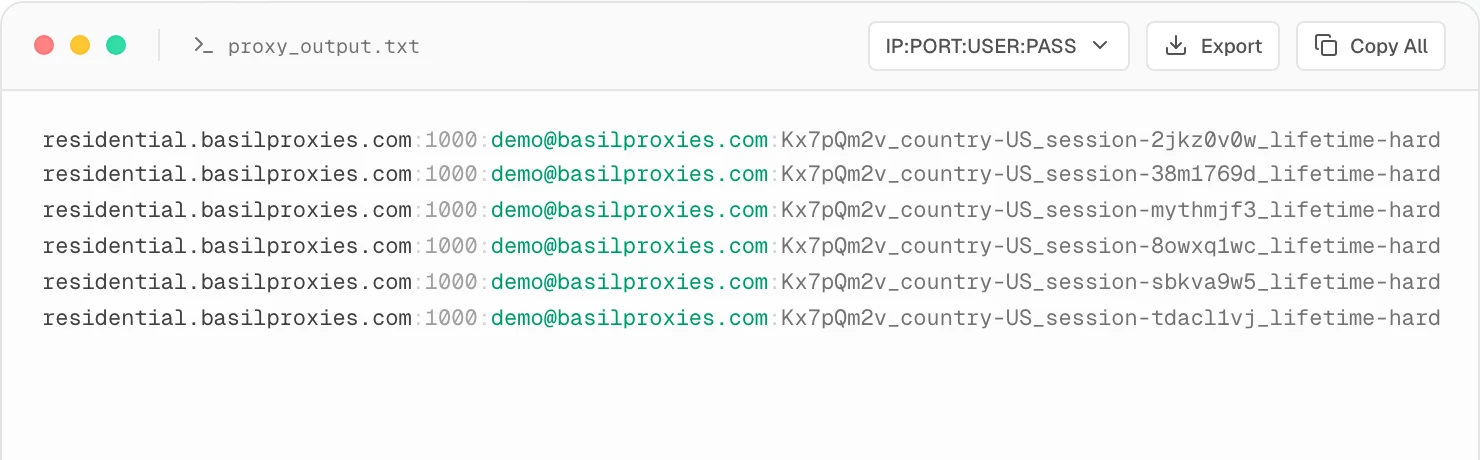
Look at the end of each line:
residential.basilproxies.com:1000:USER:PASS_country-US_session-2jkz0v0w_lifetime-hard
_lifetime-hard is the flag doing the work. Copy All takes the whole block to your
clipboard, Export saves it as a .txt.
The dashboard always writes host:port:user:pass. Most HTTP clients want a URL
instead, which is the same four values rearranged:
http://USER:PASS_country-US_session-2jkz0v0w_lifetime-hard@residential.basilproxies.com:1000
Doing it without the dashboard
The dashboard assembles a string. That is all it does — there is no registration step behind it, so you can build the same endpoint in your own code and it behaves identically.
Append two flags to the password:
import requests

USER = "your-proxy-user"
PASS = "your-proxy-password"

def endpoint(session_id, country="US"):
    pw = f"{PASS}_country-{country}_session-{session_id}_lifetime-hard"
    return f"http://{USER}:{pw}@residential.basilproxies.com:1000"

proxy = endpoint("k4mz61pq")
r = requests.get(
    "https://ipinfo.io/json",
    proxies={"http": proxy, "https": proxy},
    timeout=10,
)
print(r.json()["ip"])
Any eight lowercase alphanumeric characters work as an id. Generate one per concurrent worker and keep it for as long as that worker needs its address — the id is the session, and two workers sharing one id share one IP.
Confirm it is actually holding
Do not take it on trust. Ask the same endpoint for its own address a few times:
P="http://USER:PASS_country-US_session-k4mz61pq_lifetime-hard@residential.basilproxies.com:1000"

for i in $(seq 5); do
  curl -s -x "$P" https://ipinfo.io/ip
  echo
  sleep 30
done
Five identical lines means the session is holding. A line that differs means that IP left the network and the pool handed you a fresh one — expected behaviour, not a fault. Residential addresses are somebody's home internet and they go offline for ordinary reasons.
Worth building into anything that matters: check the exit IP before the step you cannot afford to lose, and treat a change as "start this flow again with a new session id" rather than something to retry harder. More on why in why your sticky session keeps changing IP.
Rules worth knowing
- Non-expiring is not permanent. No timer, but the IP still ends when the household device does. Plan for it.
- One id per worker. Sharing an id across concurrent tasks puts them all on one address and one reputation.
- Country and city are locked at session start. Changing them starts a new session, which means a new IP.
- Sessions are free. Residential is billed by the gigabyte; a non-expiring session costs exactly what a rotating one costs for the same traffic.
- Same flags on mobile. Mobile proxies take
_session-and_lifetime-hardidentically, against the mobile host and its own ports. Carrier IPs churn faster, so holds are shorter. - If you need weeks, not hours, no flag will do it. Rent the address instead — that is what ISP proxies are for.
Full flag reference, ports, and country codes are in the docs.
Common questions
- How do I make a proxy session not expire?
- In the Basil dashboard open Residential, set Session Type to Sticky, then press the Max button next to the session-duration slider. The duration label changes to Non-expiring and every generated proxy string ends in the lifetime-hard flag. By hand, append _session- plus any eight characters and _lifetime-hard to your password.
- Where does the session flag go, the username or the password?
- The password, always. The username stays exactly as issued. Flags are appended to the password with underscores in a fixed order — country, then city, then session, then lifetime.
- Do I need a new session id for each concurrent session?
- Yes. The session id is what identifies the IP, so two workers using the same id share one IP and one reputation. Give each concurrent worker its own eight-character id.
- How do I know the session is actually holding the same IP?
- Send repeated requests through the same proxy string to an IP echo endpoint such as ipinfo.io/ip and compare the answers. Identical values mean the session is holding; a change means that IP left the network and the pool gave you a new one.
- Can I set a non-expiring session without opening the dashboard?
- Yes. The dashboard only assembles a string. Append _session- with an id of your choosing and _lifetime-hard to the password in your own code and the endpoint behaves identically — nothing is registered or reserved in advance.
- Does a non-expiring session keep working after I close my program?
- The id keeps pointing at that IP for as long as the IP is online, so reconnecting with the same id usually lands you back on it. There is no guarantee — if the IP dropped while you were away, the same id resolves to a different address.